

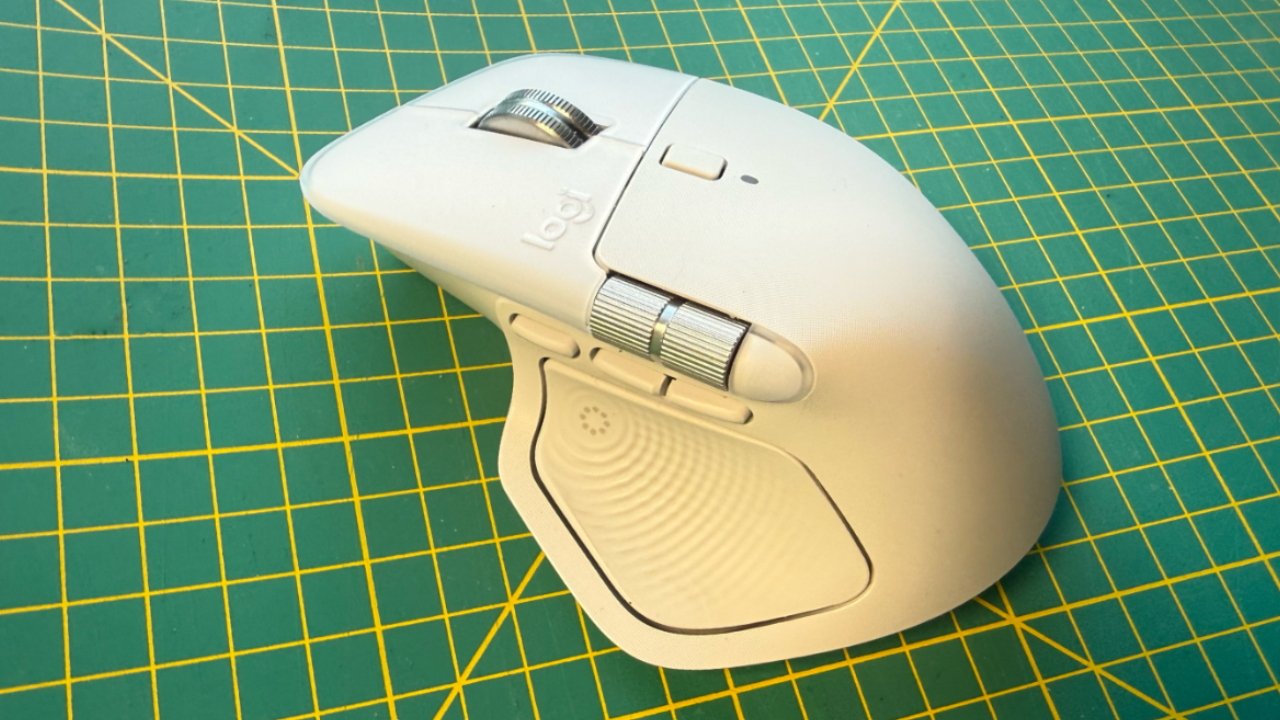
Meet the Logitech MX Master 4, a standout in the world of computer peripherals thanks to its exceptional design and build quality. From the moment you lay eyes on it, you’ll appreciate the sleek, modern aesthetics that seamlessly blend form and function. Available in multiple color options, the MX Master 4 effortlessly complements any workstation setup, whether at home or in the office.
One of the most compelling aspects of the MX Master 4 is its ergonomic shape. Logitech has meticulously crafted this mouse to fit naturally in the hand, offering optimal support and comfort during extensive use. If you’re someone who spends long hours at the computer, this thoughtful design will be a welcome relief, helping to reduce strain and prevent repetitive stress injuries.
The materials used in constructing the MX Master 4 are a testament to its premium quality. High-grade plastics and a soft-touch finish provide a sophisticated feel, while robust build quality ensures durability, even with daily use. The mouse feels solid yet surprisingly lightweight, striking a perfect balance that translates into effortless maneuvering across your desktop.
- Ergonomic Shape: Specifically contoured to support the natural posture of your hand, promoting comfort.
- Customizable Buttons: Features multiple programmable buttons, allowing you to tailor shortcuts to your workflow needs.
- Scroll Wheel: Equipped with a precision scroll wheel boasting adaptive scrolling capabilities for fluid navigation.
Imagine a mouse that not only performs exceptionally well but also enhances your overall computing experience by embracing intuitive design principles. The Logitech MX Master 4 reassures you with its commitment to quality, ensuring a reliable companion for all your computer interactions.
When it comes to performance, the Logitech MX Master 4 truly excels, marking a significant upgrade over its predecessors and many competitors. It is equipped with Logitech’s advanced Darkfield sensor, a powerful feature that ensures the mouse can track seamlessly on virtually any surface—even those as tricky as glass. This is a game-changer for anyone who finds themselves working in diverse environments or frequently on the move.
The precision of the MX Master 4 is another aspect that sets it apart. With adjustable DPI settings that can reach up to 8000, this mouse adapts to how you work, whether it’s detailed graphic design, video editing, or simply browsing. You’ll find it easy to switch between high-speed and pinpoint accuracy, enhancing your productivity across a range of applications.
Connectivity with the MX Master 4 is handled with the kind of user-friendly reliability that professionals crave. It offers both Bluetooth and USB receiver connections, making it effortless to switch between devices. This is particularly beneficial for users operating several gadgets simultaneously, as the seamless transition between them cuts down annoying workflow interruptions.
The MX Master 4 also boasts impressive battery life. With a single charge lasting up to 70 days depending on usage, it eliminates the anxiety of a suddenly depleted battery during a crucial task. For active users, this is a reassuring feature, ensuring that the mouse is ready whenever you are.
- High Precision: Customizable DPI settings up to 8000 to suit different tasks and applications.
- Multi-Device Connectivity: Easy switching between devices through Bluetooth or USB, supporting a fluid workflow.
- Extended Battery Life: Up to 70 days on a single charge, reducing downtime and increasing productivity.
Ultimately, the performance features of the Logitech MX Master 4 make it a worthy contender for those seeking a dependable, high-performing mouse. Each component of its design and technology serves to make your user experience as seamless and efficient as possible, integrating innovation with everyday usability.
The Logitech MX Master 4 elevates user experience through its sophisticated software enhancements, designed with flexibility and personalization in mind. The cornerstone of this customizable experience is the Logitech Options software, which serves as a powerful tool for personalizing the mouse’s functionalities to suit individual needs.
Through the software, users are empowered to configure button functions seamlessly. Imagine being able to assign specific tasks to the numerous programmable buttons, enhancing your workflow efficiency. The software enables you to adjust DPI settings and ensure the mouse operates precisely at a speed that you’re comfortable with, no matter the application.
- Application-Specific Settings: One of the most cherished features is the ability to tailor the MX Master 4’s functionality based on the application being used. Whether you are navigating through spreadsheets, designing graphics, or browsing the web, you can create a more intuitive interface that reacts to your program preferences automatically.
- Gesture Controls: The intuitive gesture controls are game-changers. With simple hand movements, users can execute complex commands, making everyday tasks quicker and easier than ever before.
- Easy-Switch Technology: This sleek feature allows the mouse to pair with up to three devices effortlessly. With a simple click, you can toggle between your laptop, desktop, and tablet, ensuring that your workspace remains as dynamic as your needs.
It’s easy to see why the software and customization features of the MX Master 4 are praised. These enhancements allow the mouse to adapt seamlessly to the evolving demands of today’s digital landscape. The user-focused design philosophy behind the Logitech MX Master 4 ensures that it remains not only a tool for productivity, but also a valuable ally that complements your unique workflow.
When you delve into the Logitech MX Master 4, it’s more than just a mouse—it’s an extension of your digital interaction. At the heart of its innovation are the controls designed to elevate your user experience to unparalleled heights. Imagine navigating your projects with newfound fluidity, feeling that seamless synergy in every click and scroll.
Let’s start with the newly introduced thumb wheel, a feature that truly sets the MX Master 4 apart. Positioned ergonomically for intuitive access, it brings horizontal scrolling to your fingertips. Whether you’re working on a sprawling spreadsheet or a meticulous design layout, the thumb wheel ensures that you glide effortlessly across wide documents, cutting down on time and effort. Your workflow becomes more efficient, with each move carefully crafted to reduce strain.
Adding to this arsenal of cutting-edge controls is the Logitech Flow technology, which reimagines how you interact with multiple devices. You can now move your cursor across up to three computers—even between Windows and macOS—as if they were one. With text, images, and files seamlessly transferable between systems, it’s like having a unified workstation at your command. Isn’t it comforting to know that technology can keep up with your pace, understanding that in today’s world, hopping between devices is often the norm?
Gesture controls further redefine interaction, allowing you to execute complex commands with simple hand movements. Imagine a tool that adapts to the nuances of your work rhythm, understanding those quick swipes and clicks that dominate your day. The MX Master 4 brings this where gestures provide swift access to actions like switching between desktops or launching applications. It’s such thoughtful design that saves you valuable time and lets you stay in the zone, particularly during those intensive work sessions.
Each of these controls allows you to reclaim the essence of time, precision, and fluidity in your work. Behind their sleek, sophisticated interface lies a promise—to transform everyday tasks into streamlined processes and to make that mundane click a catalyst for extraordinary possibilities. The MX Master 4 is an acknowledgment of your aspirations, a respect for your workflow demands, a promise that your tool will always be as dynamic as you are.
While the Logitech MX Master 4 has much to offer, it is essential to weigh its strengths and drawbacks to reach an informed decision. On the plus side, the mouse features innovative design elements and superior customization options, making it an indispensable tool for professionals and casual users alike. Its ergonomic design ensures comfort during prolonged use, reducing the physical toll on your hand and wrist, which is particularly important for those who spend countless hours at their computer.
- Ergonomic Design: The MX Master 4 offers exceptional comfort, thanks to its well-crafted design that fits naturally in the hand. This is particularly beneficial for those prone to discomfort after long work sessions.
- Innovative Controls: The addition of a thumb wheel for horizontal scrolling and gesture controls enhances the user experience significantly, providing more intuitive navigation and efficiency.
- Multi-Device Connectivity: Users can appreciate seamless connectivity across multiple devices, ensuring a fluid transition between workflows without needing to reconnect each time.
- Extended Battery Life: Its impressive battery life eliminates concerns about constant recharging, allowing up to 70 days of use on a single charge, depending on use frequency.
However, as with any device, the MX Master 4 comes with its set of drawbacks. One major consideration is its right-handed design, which may exclude a segment of users from fully experiencing this exceptional tool. Moreover, while the mouse offers versatility and high performance, there is a learning curve for users unfamiliar with advanced customization options, which might be intimidating at first.
- Exclusively Right-Handed: Unfortunately, the designs don’t cater to left-handed users, limiting its ergonomic benefits to right-handers.
- Learning Curve: The abundance of features and customization options can be overwhelming for new users, potentially causing initial confusion before mastery is achieved.
- Premium Price Point: While the mouse offers cutting-edge features and comfort, its higher price point may not be justifiable for every user, especially those with more basic needs.
Taking into account both the pros and cons, the Logitech MX Master 4 proves to be a highly capable mouse equipped with features that cater to improving comfort and productivity. While it might not be the perfect fit for everyone owing to its right-handed design and complex functionality, those who take full advantage of what it offers will find the device a powerful ally in achieving optimal workflow efficiency. For related coverage, see our Technology enhances diver safety amidst ocean dangers.
