

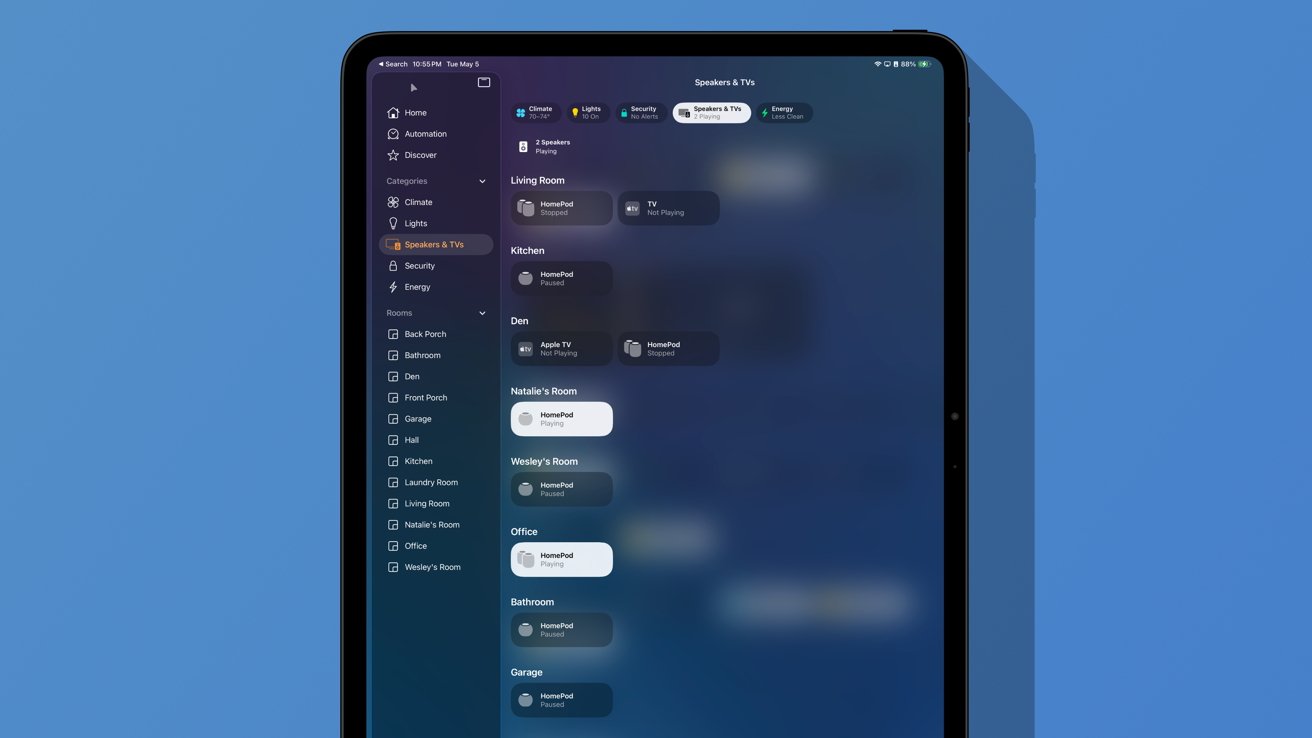
Deciding which HomePod best suits your space is a journey of blending your personal preferences with the practicalities of your home. It’s about finding happiness in your daily interactions with technology and ensuring every corner of your living area resonates with the comforting sounds you cherish.
Consider the ambiance you wish to create in each room. The original HomePod’s robust sound quality can fill expansive areas with a rich, immersive experience. It stands as a proud companion to larger living spaces like open-concept areas or entertainment-centric zones where audio quality can transform a movie night or a lively gathering.
On the other hand, the HomePod mini, with its more compact size and budget-friendly nature, offers flexibility. Perhaps your morning routine begins in a cozy nook of the house where gentle music enhances your start. Or, there’s the kid’s room, where bedtime stories via audiobooks could become a magical moment with a mini’s presence.
Think beyond simple placement, envision your home and the experiences you want to cultivate. Maybe the living room is where laughter fills the air often, and you want sound to dance comfortably across the room. For this, pairing two classic HomePods for a stereo effect can bring warmth and clarity to the conversations and music you love.
The HomePod mini can wonderfully transform smaller or secondary spaces into rich sound environments without overwhelming the room. It’s perfect for a kitchen soundtrack while you cook or a peaceful workspace soundtrack during your office hours.
Remember, each HomePod model offers unique advantages that align with different spaces. Your choice should harmonize with your lifestyle and enhance your surroundings. As you make your selections, be ready for joy as conversations, music, and memories fill your home with effortless grace and quality.
Once you’ve chosen the right HomePod for each space, the next step is configuring your setup to fit your unique lifestyle and preferences. This process is about creating an audio system that feels natural and efficient in your daily life, tailoring your setup to ensure the best acoustic performance and practical usage.
Begin by determining the optimal placement for each HomePod. Consider the room shape, size, and potential obstacles like furniture that might impede sound projection. Placing a HomePod near a wall can enhance the bass response, but be mindful not to block the device, as it uses an array of sensors to understand its environment and adjust sound output accordingly.
If you’re setting up a stereo pair, ensure each HomePod is at an equal distance from your sitting area for balanced sound distribution. This arrangement will provide a richer, more expansive audio experience, allowing you to enjoy music or films with depth and clarity. A stereo pair works beautifully in living rooms or home theaters, enhancing everything from blockbuster movies to intimate acoustic sets.
In areas where a single HomePod suffices, like bedrooms or small offices, position the HomePod where its smart features can effectively reach you. Perhaps it’s bedside for easy access to Siri for morning alarms or near your study desk to efficiently manage reminders and task lists.
Consider integrating your HomePods with other devices for a seamless smart-home experience. Link them with your Apple TV for enhanced surround sound or pair them with HomeKit-enabled devices to control your home with ease. The idea is to create interconnected systems that are simple to navigate and enhance your everyday living.
Remember, configuring your HomePod setup isn’t just about achieving optimal sound. It’s also about ensuring your HomePod is part of a larger, smart ecosystem that streamlines your life, blending technology into the background so that you can focus on what matters. Enjoy this journey of customization and find satisfaction in the small adjustments that make your home resonate with the perfect audio ambiance.
AirPlay 2 is your go-to feature for elevating the versatility of your HomePod system, opening a world of possibilities beyond just streaming your favorite tunes. It’s about enhancing your audio experience, making life easier, and creating a soundtrack that resonates throughout your entire home.
Imagine moving from room to room and having your favorite podcast or playlist follow you seamlessly without missing a beat. AirPlay 2 makes this possible by allowing you to connect multiple HomePod devices across different rooms, crafting a synchronized audio environment that’s entirely under your control. With just a tap, you can play different songs in separate areas or the same melody across your entire home, giving you unparalleled flexibility in how you enjoy audio.
- Create Zones: Perhaps you want the kitchen and dining room to share the same track for continuity during meal prep and dinner, while the kids enjoy their own tunes in the playroom. With AirPlay 2, establishing these listening zones is effortless and intuitive.
- Smooth Transitions: Planning a summer soiree? Let the music set the mood. Transitioning from lively tunes on the patio to relaxing jazz in the living room happens without interruptions. Your guests will appreciate the seamless audio flow, enhancing the ambiance of your get-together.
- Easy Commands: Whether you’re hosting or unwinding after a long day, AirPlay 2 keeps your control at the ready. Use your Apple device to adjust volume levels, switch songs, or redirect audio to another part of your home with ease, ensuring you’re never far from the perfect sound experience.
One of the most comforting aspects of AirPlay 2 is the simplicity it introduces to your life. It’s not just about connecting speakers—it’s about melding technology with everyday moments to create a sonorous landscape perfectly attuned to your lifestyle. AirPlay 2 handles the technical finesse, allowing you to revel in the beautiful symphony of a connected home where music is always within reach, waiting to elevate your daily routine.
Integrating Siri with your HomePod is about creating seamless interactions that enhance your daily routine. Embrace the convenience of voice commands, controlling music and smart home devices with just a word. Imagine telling Siri to play your favorite playlist when you’ve just woken up, or setting a reminder while your hands are full cooking dinner.
Leveraging Siri’s capabilities on the HomePod, you can customize commands to fit your lifestyle. Teach Siri the music genres you prefer at different times, or automate daily tasks to free up mental space. Use simple phrases to initiate complex routines, like dimming lights and playing soft music as you relax in the evening.
Our devices should serve us intuitively, and with Siri, your HomePod becomes a virtual assistant dedicated to personalizing your home experience. From quick answers on trivia nights to turning off all the lights as you head to bed, Siri’s integration extends the HomePod’s functionality, ensuring your needs are met with minimal effort.
- Personalized Playlists: With Siri, request playlists tailored to each moment. Whether it’s an energetic workout mix or calming tunes for meditation, your wish is Siri’s command.
- Home Automation: Incorporate Siri into your smart home setup to trigger scenes like “Good Morning” or “Movie Night,” adjusting lights, locks, and climate with one request.
- Hands-Free Calls: In the midst of cooking or crafting, use Siri to place hands-free calls or send messages, keeping your productivity uninterrupted.
Integrating Siri with your HomePod taps into the power of a smart assistant embedded in your home’s fabric. Let your technology work harmoniously to create an ambient lifestyle tailored specifically to you. Embrace the simplicity and efficiency of voice control, and transform how you interact with your environment, one command at a time. For related coverage, see our Apple narrows Mac Studio and Mac mini configurations amid RAM crisis.
