

You’re not alone if you’ve ever felt bombarded by the relentless stream of notifications on your iPhone. With iOS 16, Apple has introduced several features designed to help you manage notifications more effectively and regain control of your attention.
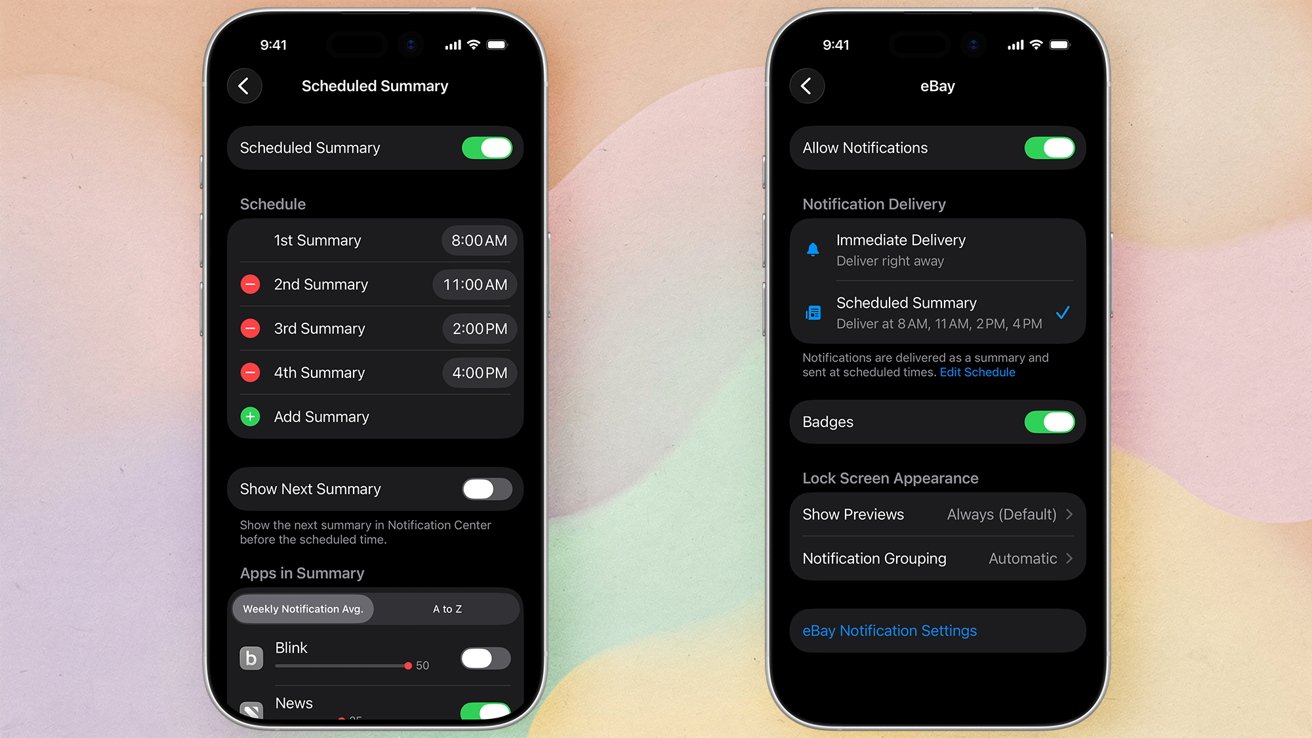
One of the standout features is the Notification Summary. This innovation allows you to collect notifications and deliver them at predetermined times, reducing distractions and keeping your lock screen neat. Setting up Notification Summary is a simple way to ensure you receive only the information you need and when you need it, without interruptions.
Live Activities is another game-changing feature, offering real-time updates on ongoing events right at your lock screen. Whether you’re following the score of a crucial sports match or awaiting your food delivery, this feature ensures you have important information at your fingertips without a deluge of alerts.
Focus Modes take personalization to the next level, allowing you to tailor notifications based on your current activity. Whether you’re working, relaxing, or sleeping, you can set which notifications come through and when, ensuring disturbances are kept to a minimum. This customization ensures that your iPhone works in harmony with your schedule, supporting your productivity and personal time.
Understanding and utilizing these new features can dramatically transform your day-to-day interaction with your device. By organizing how and when you receive notifications, you can create an iPhone experience that supports rather than distracts, promoting a healthier digital lifestyle. Explore these features to ensure that your phone remains a helpful companion, not a relentless interrupter.
Customizing notification settings on iOS 16 is all about reclaiming your peace of mind while making sure you stay informed about things that matter most. Apple’s thoughtful approach allows you to shape notifications to fit your lifestyle seamlessly — whether you’re racing to meet a deadline, enjoying a quiet moment, or catching up on personal time.
When you enter the notification settings, you have the power to decide how each app communicates with you. Maybe you’re someone who thrives on visual cues like Banner notifications, those appearing briefly on top of your screen without interrupting what you’re doing, or perhaps persistent Alerts are your preference, requiring your attention to move forward. You can make these decisions app by app, ensuring your notification experience is as intentional as you are.
For those who prefer a more visually soothing device, adjusting the Notification Badges is vital. It’s a practical step if you find the red dots on your apps too distracting. By turning off notification badges for less urgent apps, you can keep your home screen tidy and focus on the apps that need immediate attention.
Notification Grouping in iOS 16 is a gem for simplifying your lock screen and the Notification Center. Instead of random alerts scattered across your screen, you can choose to group notifications by app, making your interactions with them clean and organized. It’s like giving your iPhone a personal organizer, sorting everything precisely so you can glance at exactly what you need.
With these customizable settings, you create an environment where your device truly feels like it’s working for you, not against you. Whether you’re looking to boost productivity, minimize distractions, or simply curate your digital interactions better, these features are powerful tools in your hands.
- Access Settings for full control over each app’s notification style.
- Adjust display options to match your preference, selecting from Banners, Alerts, or Badges.
- Make groupings intuitive and clear, streamlining the way you handle notifications daily.
Remind yourself that taking the time to customize these settings is an investment in how smoothly your day unfolds. By designing how your iPhone communicates with you, you’re ensuring that it enhances your life with efficiency and joy.
As you delve into managing notification sounds and badges in iOS 16, imagine how liberating it will feel to tailor the way your phone demands your attention. Notifications are more than just noises or numbers—they’re moments where your device extends its hand into your daily life. By fine-tuning these, you regain the balance between staying updated and maintaining peace.
Let’s start with notification sounds. Personalizing these can be a charming way to ensure your alerts are as unique as you are. Whether it’s the subtle chime for a new message or a customized alert for your favorite app, these sounds should either gently remind you or capture your attention when needed. Perhaps there’s a special sound that signifies an important incoming email or an upbeat melody for a text from a friend. By altering the standard notifications, you make your iPhone truly yours, a seamless extension of your personality.
- Navigate to Settings.
- Tap Sounds & Haptics to explore the sound options for notifications.
- Select your desired sound for Text Tone or other app notifications and explore new melodies that resonate with you.
Then there are badges—those tiny red icons that signal unread messages or pending actions. They can be immensely helpful, but they can also foster pressure and urgency if unchecked. Deciding where and when to see these badges can significantly alter your smartphone relationship. For some, turning off badge counts for certain apps can be the first step toward reducing digital clutter and anxiety. It allows you to focus on what truly needs your attention without feeling overwhelmed by the endless call for action those red numbers signify.
- Go to Settings and tap Notifications.
- Choose the app for which you want to adjust badges.
- Toggle off Badges for those apps that don’t require immediate attention.
Personalizing the audio and visual cues on your device makes your interaction with technology efficient and enjoyable. Each tweak and toggle transforms your iPhone to not simply deliver alerts but to do so in ways that align with how you prefer to live your life. From setting a calm, consistent tone to only seeing badges that are truly indispensable, these adjustments empower you with more control over your iPhone’s interaction, making your digital life a well-orchestrated symphony rather than a cacophony.
Take a few moments to revisit these settings. They serve as a testament to your commitment to managing the noise and creating a digital experience that supports and enhances your daily routine. With thoughtful customization, your iPhone becomes not just a tool but a companion that respects your space and responds to your needs with precision.
Feeling overwhelmed by the barrage of notifications flooding your iPhone might resonate with you, and it’s a common experience for many. Apple’s iOS 16 offers the handy feature of managing Scheduled Summaries to regain your focus amidst the constant digital chatter.
Scheduling your notifications is liberating—it allows you to create a serene environment where alerts are delivered at times you choose, rather than interrupting your flow throughout the day. By grouping notifications to appear at certain times, you maintain a sense of order and ensure that only the most relevant information reaches you when it truly matters.
- Begin by opening the Settings app on your iPhone.
- Select Notifications.
- Tap on Scheduled Summary to access this feature.
- Toggle the Scheduled Summary setting to enable it.
- Determine the timing that aligns best with your schedule, deciding when summaries should pop up.
- Choose the apps you want included in these summaries, opting to keep distractions at bay yet remaining informed.
- Whenever you’re ready, simply press the back button to save your selections and return to the main Settings menu.
This feature hands the reigns back to you, allowing you to mold an experience that not only helps minimize interruptions but also aligns your technology more harmoniously with your lifestyle. Whether it’s starting your morning with insightful news or winding down in the evening free from the clamor of notifications, Scheduled Summaries can be crafted perfectly to your daily rhythm.
Enabling this flexibility on your iPhone encourages a more balanced and less disruptive engagement with your device. As you explore and adjust the frequencies and times that suit you best, you’ll likely find your focus improving, with a clearer mind to tackle tasks without losing sight of your personal or professional priorities.
Empower yourself with the simple pleasure of controlling not just what appears on your screen, but precisely when it does. This thoughtful feature is about acknowledging your pace and rhythm, letting your iPhone be a seamless assistant that respects your boundaries while supporting your need to stay updated.
It’s easy to feel overwhelmed when certain apps continually vye for your attention with incessant notifications. These persistent updates might be important for some apps, but others just add to visual and mental noise. In iOS 16, Apple makes it easier to silence those interruptions, providing you with the tranquility to concentrate on what matters most.
If an app is more of a nuisance than a necessity with its notifications, you have the power to switch them off entirely. This is an ideal solution for apps that are infrequently used or just too aggressive with their alerts. Letting go of non-essential notifications provides a sense of relief and a cleaner, calmer notification experience on your device.
- First, tap Settings on your iPhone to access all your device’s capabilities.
- Proceed by selecting Notifications from the list.
- Browse through your apps until you locate the specific one whose notifications you want to mute.
- Upon selecting the app, toggle the Allow Notifications switch to the off position.
It’s that simple. By turning off notifications for specific apps, you effectively grant yourself more room to breathe, enabling your priorities to shine without unnecessary interruption.
This thoughtful approach to managing app notifications allows you to enjoy uninterrupted moments, free from the digital demand for your attention. You can check in on those apps at your own convenience, ensuring a balance between staying updated and staying focused. Use this feature to regain control over your notification landscape, and experience a smoother, more personalized interaction with your iPhone. The freedom to determine which communication does and doesn’t reach you is a surefire way to enhance both your well-being and productivity. For related coverage, see our Apple Intelligence reveals biases in AI notifications.
